Sell and serve ยท Audio to Action

Call Transcription and AI Call Notes for NZ Teams

Datan8 turns phone calls, Google Meet meetings and voice notes into transcripts, summaries and follow-up tasks, so the details of every conversation are captured without anyone taking notes.

Part of Sell and serve.
AI call summaries

AI call summaries your team will actually use

Important details get lost in conversations every day: the customer's real problem, the date you promised, the next step someone agreed to. Audio to Action captures them. Our call transcription runs in English with speaker labels, then the AI writes a short summary and turns what was agreed into tasks.

It works with calls through your Datan8 numbers, meetings imported from Google Meet, recordings uploaded from anywhere and voice notes from the Datan8 mobile app. Everything lands on the right contact, so your whole team can see the history.

From call recording to follow-up

Every conversation turned into something useful.

Fast transcription

English transcripts with speaker labels, ready within moments of the conversation ending.

AI summaries

A short summary of each call or meeting, using the fields you choose, such as next steps, objections and agreed dates.

Tasks created for you

Action items and follow-ups become tracked tasks on the right contact, so they are easy to track.

Searchable history

Search every transcript to find that one quote, agreement or detail in seconds.

Where it works

Meeting notes, mobile calls and more

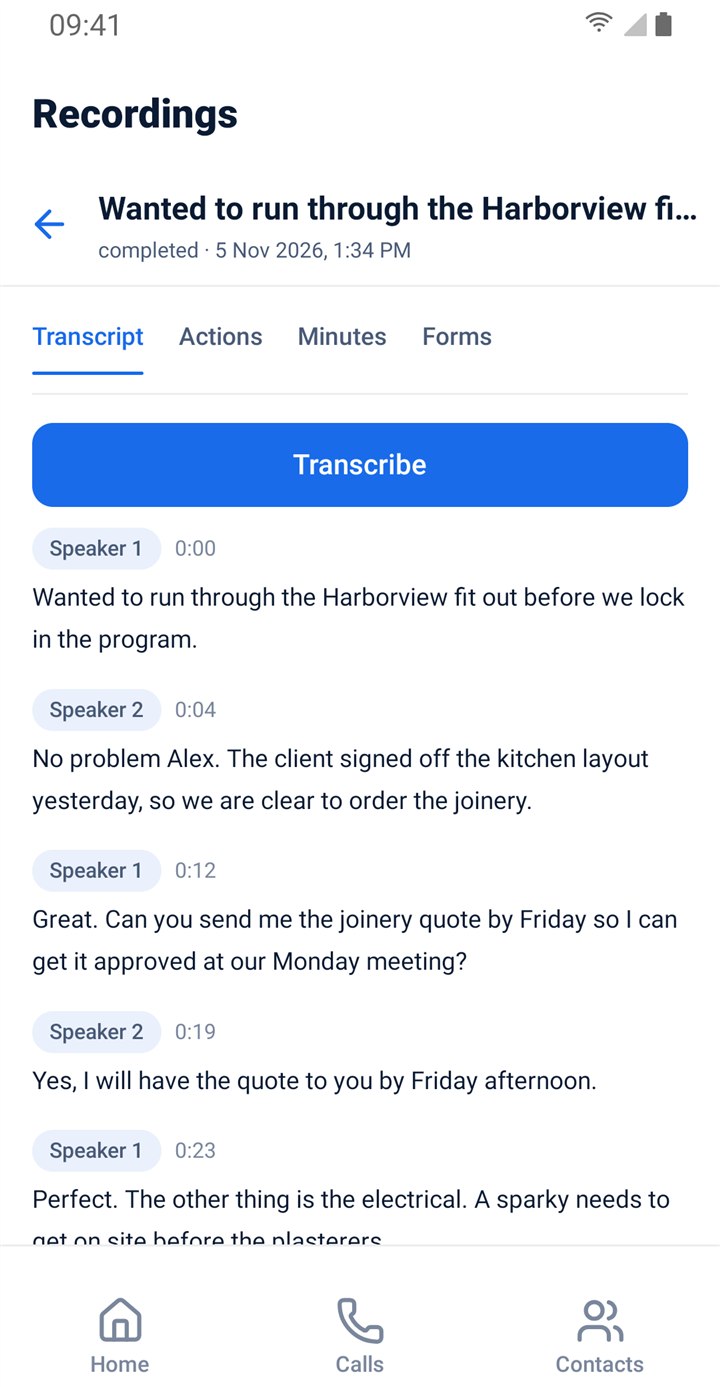
A meeting transcript in the DataN8 app with Speaker 1 and Speaker 2 labels

Datan8 mobile app

Make and take calls, record voice notes and see actions and contacts from your phone, wherever you are working.

Google Meet import

Meetings from Google Meet are imported automatically, with notes and forms filled in from what was said.

AI phone receptionist

When nobody can answer, the receptionist takes the call, captures the details and creates a follow-up task.

Built-in CRM

Transcripts, summaries and tasks land on the contact in Datan8, ready for whoever picks up the next step.

How Audio to Action works

  1. Capture

    Calls, Google Meet meetings, uploads and mobile voice notes are collected in one place.

  2. Transcribe

    Each conversation is transcribed in English with speaker labels.

  3. Summarise

    The AI writes a summary using the fields you choose and lists what was agreed.

  4. Act

    Agreed actions become tasks on the right contact, ready for your team to pick up.

Call transcription questions from NZ businesses

How accurate is AI call transcription?

Clear audio gives the best results. Every transcript includes speaker labels, and each summary links back to the full transcript, so anyone can check the exact words when a detail matters. Calls from a good headset or a quiet room transcribe more cleanly than calls from a noisy site.

Which languages are supported?

Transcription currently supports English, with speaker labels included as standard. Summaries and tasks are written in English too, using the fields you choose for your business. If most of your calls are in English, it is ready to use straight away.

Can it record and summarise Google Meet meetings?

Yes. Meetings from Google Meet are imported into Datan8, transcribed with speaker labels and summarised. Agreed actions become tasks, and where you have set up a form for that type of meeting, its fields are filled in from what was said.

Do I need a new phone system?

No. Calls run through Twilio, so we can give you new numbers or forward your existing lines, and your team can make and take calls from the Datan8 mobile app. You keep the phone numbers your customers already know and use.

Is my call audio secure?

Yes. Audio is encrypted in transit and at rest and stored in Australia on Microsoft Azure, and it is never used to train AI. Copies held by the phone carrier are deleted after the retention period you set, so recordings live only where you expect them to.

Can I choose what goes into each AI call summary?

Yes. You decide the summary fields, such as sentiment, next steps, objections or agreed dates, and the AI fills them in the same way for every call. That keeps notes consistent across your team and makes conversations easy to compare over time.

Can the AI receptionist take calls when we are busy?

Yes. When nobody can answer, the AI phone receptionist picks up, asks for the caller's name and reason for calling, and creates a follow-up task with the transcript attached. Your team sees exactly what the caller needed and can call back prepared.

Turn every conversation into action

Book a free demo and see your own calls turned into transcripts, summaries and tasks.

How this site measures visitsDo not track my visits